
Home of RightFolder, the ultimate file organizer!
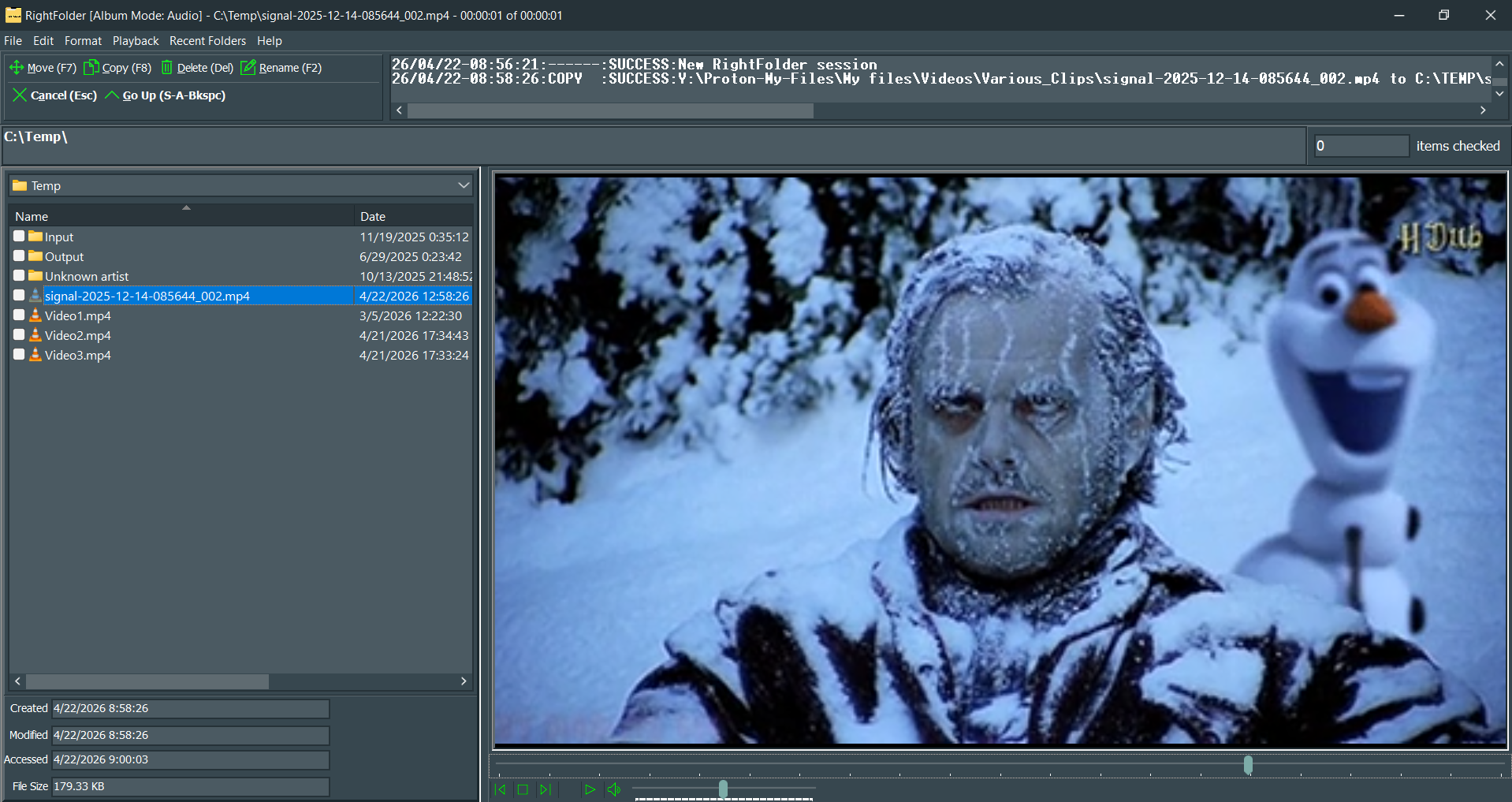
Showing Video Playback
So, what does RightFolder do, anyway?
Are you an avid collector of all-things-Internet (memes, animated GIFS, PDFs, videos)? Do you collect a lot of research material and need to quickly organize it into folders? RightFolder to the rescue! RightFolder was designed to allow you to quickly and accurately select files and move or copy them to their rightful folders using “profiles” that you create (with minimal typing – in most cases, you just need to enter a name for the profile).
RightFolder is also a very capable file viewer when the optional (but strongly recommended) free-to-use programs VLC and Adobe Acrobat Reader DC are installed! RightFolder can preview:
Any audio or video file that VLC can handle (when VLC is installed).
Most images - BMP, EMF, GIF (standard & animated), ICO, JPG/JPEG/JFIF, PCX, PNG, SVG, TIF/TIFF, WEBP (standard & animated), and WMF.
Any PDF file that Acrobat can handle (if Acrobat is installed, or another PDF viewer that previews in Windows Explorer).
Office documents (if you have Microsoft Office or Microsoft 365 installed). (This is limited to the document types your Office installation supports.)
Rich Text Format (i.e., WordPad) documents, and text files, with optional word wrap. (Note that Microsoft removed WordPad in Windows 11 version 22H2 and later, so RTF documents may not display with images in those versions of Windows unless you install a third-party RTF viewer that works with Windows Explorer. If you do install such a viewer, make sure to change the RTF extension from "Text" to "Default". If you have Microsoft Word installed, you should change this extension from "Text" to "Office" - Office will preview it correctly.)
As a fallback, RightFolder’s default previewer is used to display any file type it is unaware of. If it can be previewed in Windows Explorer, it will usually preview in RightFolder too!
RightFolder can optionally play all the audio or video files (or both) in a given folder while skipping over other files (something we call “album mode”), and optionally repeat them.
RightFolder will also warn you when you try to preview an image with the wrong extension. It currently recognizes BMP, GIF, ICO, JPG, PCX, PNG, TIF and WMF image types.
You can undo previous file transports, deletions and renames. (NOTE: You must have the "Use Recycle Bin for deletions" option turned on to roll back deletions.)
You can create single- or multi-folder relative or full-path M3U playlists. These playlists can include both audio and video files, and are playable with VLC. Playlists created with relative paths are playable on Windows, Linux and Android, and maybe Mac. (Apps other than VLC may or may not support both audio and video.)
What's a RightFolder profile?
A RightFolder profile consists of file extension(s), like ‘TXT’ and ‘GIF’, and destination folder references. When you go to move or copy files, RightFolder will use their extensions to match them to profiles that contain the folders you may want to move or copy the files to. Profiles (and the destination folders within them) are all given SINGLE KEY keyboard shortcuts to allow you to quickly select them! You can create up to 62 profiles (with up to 62 destination folders within each one), and select them with these keyboard shortcuts. You can select as many extensions per profile as you want (or create your own), and you can change RightFolder’s behavior for any given extension (e.g., treat an “RM” file as a text file instead of an audio file).
Requirements
RightFolder requires Windows 10, version 2004 (build 19041, codename: 20H1, May 2020 update) or better.
RightFolder *may* operate with older versions of Windows, with or without compatibility mode, but proper operation cannot be guaranteed. For example, it has been successfully operated on Windows 10 using Windows 8 compatibility mode, but may fail when run on a real Windows 8 system. RightFolder WILL NOT run on Windows 7, but WILL run on Windows on ARM (although the 32-bit version on ARM has an issue with WebP support). IMPORTANT NOTE: RightFolder does run on Windows 11, but you may need to make the following changes to allow the installer to work:
Microsoft has disabled the UAC prompt by default, so an average user cannot enter administrative credentials to install the required VC++ Redistributables that are necessary during the installation. If this prevents you from installing RightFolder, log on as an administrator and open an administrator-level command prompt. Then, enter the following command:
net user administrator /active:yes.
Windows will create a local administrator account & UAC prompting will now work. ADD A PASSWORD TO THE NEW ADMIN ACCOUNT! Then, uninstall RightFolder, switch back to the regular Windows account and reinstall RightFolder.
IMPORTANT: Right Folder comes in both 32 and 64-bit versions. If you wish to install VLC or Acrobat (and you should), you MUST use installers that match! In other words, for a 32-bit environment, use the 32-bit RightFolder installer along with the 32-bit installers for VLC and Acrobat. For a 64-bit environment, use the 64-bit RightFolder installer along with the 64-bit installers for VLC and Acrobat. Note that the 32-bit version of RightFolder DOES run on Windows 10 on ARM, but the 64-bit version has NOT been tested on Windows 11 ARM devices. We hope to try that shortly.
If you're running the 64-bit version of Windows for Intel-based machines, you can use either 32-bit or 64-bit installers, but we recommend the 64-bit installers for performance reasons. Use System Information from the Start menu to determine which operating system you're running.